
How to stop doomscrolling, step by step
To stop doomscrolling, put something between the urge and the app that costs more than one tap. A pause before the app opens works better than a limit you can dismiss, because it catches the habit at the moment it starts. The seven steps below add that friction and give you something else to do.
Coming soon to iPhone
What is doomscrolling?
Doomscrolling is spending an excessive amount of time on digital content that stirs up negative emotions, such as bad news or endless short videos. Wikipedia says the term was coined around 2018 and became widespread during the COVID-19 pandemic. It lists negativity bias, fear of missing out and a wish to gain control over uncertainty among the reasons people do it.
A 2024 Morning Consult survey, as cited there, found that about 31 percent of American adults doomscroll regularly, with 46 percent of millennials and 51 percent of Gen Z. The same article notes that people who said they did not doomscroll were later observed doing it. That gap between what we think we do and what we do is the reason the steps below rely on structure and not on good intentions.
Why is it so hard to stop?
Feeds have no natural end. Infinite scrolling loads new material as you move down the page, so the point at which a magazine or a web page would have ended never arrives. The Doomscrolling article on Wikipedia describes the missing stopping cue as a path to problematic smartphone use. Algorithmic recommendations that favor engaging, often negative, content add a second pull.
There is also the plain fact of habit. Most doomscrolling starts without a decision: a thumb finds the icon while you wait for a kettle. Willpower works on decisions, and this one was never made. So the useful target is the moment of opening, not the hour of use.
What are the seven steps?
Here is the whole plan in one list. The sections after it explain the reasoning and the details, so you can read the list first and come back for the parts that matter to you.
- Notice the moment you open the app. Count openings for two or three days.
- Put a pause before the app, not after an hour of use.
- Make the pause cost more each time you come back.
- Choose the time window before you go in.
- Decide what you will do instead for the next two minutes.
- Treat mornings and nights as separate cases with harder rules.
- Track the times you turned back, not only the minutes.
Why does a pause before the app work better than a limit?
Start with step 1. For two or three days, do nothing but count. Each time you open the feed app without a purpose, make a mark on paper. Do not try to change anything yet. The number is usually higher than expected, and it tells you which one or two apps need a gate first.
Limits fire at the end of a session, when you are already deep in the feed and annoyed at being stopped. A pause before the app opens catches you at the start, when it is easiest to say no. On iPhone you can do this with a Shortcuts automation that runs when a chosen app is opened. A guide to the setup is in how to run a Shortcut when an app opens.
The pause needs to cost something. A plain breathing prompt tends to become a tap you stop seeing, and user reports in online forums describe exactly that after about a week. A short round with right and wrong answers, like the one in the Ebb gate, cannot be passed without paying attention for 15 seconds.
Step 3 adds escalation. One pause is a speed bump. Five in an hour should feel like a wall. If each pass costs more than the last, the second and third opening of the day take real effort, and you start asking whether you need the app at all. Ebb Pro does this with rounds of 15, 30 and 60 seconds, described under pass costs. You can copy the idea by hand: after every opening, wait one more minute than before.
How do you set a window and plan a replacement?
Step 4 is to decide how long you will stay before you open the app. A window of 5 or 10 minutes turns an open-ended loop into an errand. Set a timer or let an app remind you when the time ends. Be honest about the limit: nothing can close the app for you except you, so a reminder only works if you already want to stop.
Step 5 is the replacement. An urge that is blocked and not replaced comes back. Write a short list of two-minute things that need no screen: read two pages of a paper book, walk to the end of the street and back, text a friend something specific, drink a glass of water. Put the list where the phone usually sits. Ebb offers three such ideas from your own answers at every gate, see Instead.
Keep the list small and physical. A task like organize my life is too big for two minutes and invites you back to the phone. A task like fill a glass of water finishes on its own, and finishing is what makes the next pause easier.
What about mornings, nights and tracking?
Step 6 treats mornings and nights separately. Many people doomscroll in bed, right after waking and just before sleeping, when self-control is lowest. Charge the phone across the room, and use a harder pause in those hours. In Ebb Pro, the Morning rule covers the first 60 minutes after your wake time and the Night rule covers bedtime to wake time, both with 60-second rounds. If scrolling at night is how you wind down, give the evening a fixed endpoint and a replacement, such as a book on the pillow.
Step 7 tracks turn-backs and not only minutes. Screen time totals are easy to hate and easy to ignore. Count the times you opened the pause and left. Each turn-back is a small win you can see. A weekly check-in with your own Screen Time number from iOS Settings shows the trend over a month. Ebb's Scroll Receipt turns that daily figure into days per year, labeled as arithmetic on your own number.
Which methods hold up best?
No method is perfect, and every one can be switched off by you. The question is how much friction each adds at the moment of opening.
| Method | Friction at the moment of opening | Weak point |
|---|---|---|
| Screen Time limit | None until the limit is hit | Ignore Limit is one tap |
| Breathing pause | A few seconds | Becomes a habit tap |
| Deleting the app | High at first | Reinstalling takes a minute |
| Grayscale screen | Low | Easy to ignore after a week |
| Focus round before opening | 15 to 60 seconds of attention | You can delete the automation |
Where does Ebb fit?
Ebb is the pause in step 2 and 3, built for iPhone. It is a speed bump, not a lock. It is in development and not on the App Store yet, so for now use the steps by hand. The app will always let you turn the gate off, and a pause is only as strong as your wish to use it. If you want to try the same idea with just Shortcuts, start with a single app that you open most.
Frequently asked questions
How do I stop doomscrolling at night?
Charge the phone across the room, set a fixed time to stop, and put a pause in front of the feed app for those hours. Replace the scroll with a two-minute habit such as reading two pages.
Does doomscrolling count as addiction?
Wikipedia says it can be considered a form of internet addiction disorder, though that is a descriptive label and not a diagnosis. If it harms your sleep or mood, talk to a health professional.
Is it better to delete the app?
Deleting works for some people and is easy to undo. Keeping the app with a pause in front of it suits those who need it for messages or work.
How long does it take to break the habit?
There is no fixed number. Counting your openings for a few days shows progress sooner than a calendar goal does.
Can a Shortcut stop me from opening an app?
A Shortcut cannot lock an app. It can run something when the app opens, such as a pause or a game, and you can always turn it off.
Keep exploring
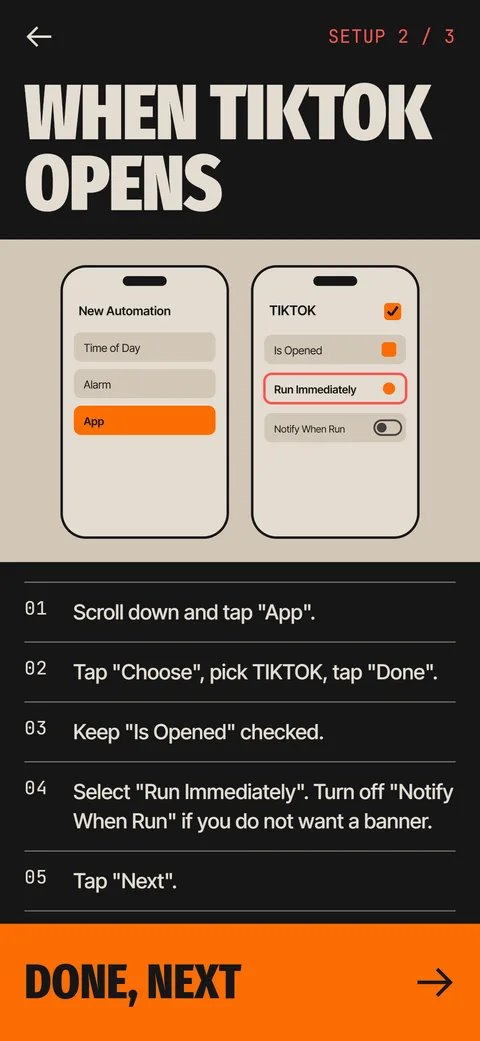 How to Run an iPhone Shortcut When an App OpensThe App trigger in Shortcuts, step by step, with the settings that matter and what to do when it flashes.The Ebb GateA Shortcuts automation opens Ebb first. Pass the round, then pick 5, 10 or 15 minutes.
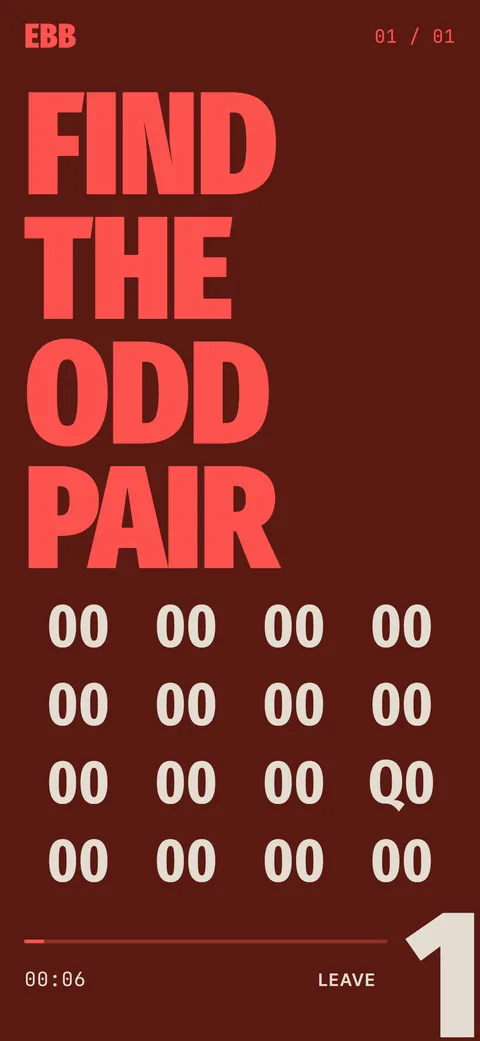 Ebb InsteadTwo-minute alternatives in six categories. 40 ideas, 6 in the free version, plus your own.The Goldfish Attention Span MythWhere the 9-second goldfish claim came from, what goldfish can really do, and how attention actually works.A Digital Minimalist iPhone Home ScreenNine Home Screen changes for a calmer iPhone, from one page of tools to search-first app opening.