How to run a Shortcut when an app opens on iPhone
To run a Shortcut when an app opens on iPhone, create a personal automation in the Shortcuts app. Choose the App trigger, pick the app, keep Is Opened checked, select Run Immediately and add the action you want. The whole setup takes about two minutes for each app.
Coming soon to iPhone
What do you need?
You need an iPhone with the Shortcuts app, which has been installed by default since the public launch of iOS 13 in September 2019). Automations can start after an event such as a time of day, leaving a location or opening an app, according to the same article. This guide uses the last one.
Decide what should happen when the app opens. Typical choices are to turn on a Focus, set the brightness, open a note or show a pause screen. Apple documents the basics in the Shortcuts User Guide.
Before you start, write down which app you want and what you expect to happen. Vague plans lead to automations you delete after a day. A single clear action, such as show a pause screen when a feed app opens, is far easier to test than a chain of five.
Also decide whether the automation is for you alone or a family device. Personal automations live on your own iPhone and run only there. If you share the phone, tell the other people what will happen when they open the app, since the screen that appears can be surprising.
How do you create the automation?
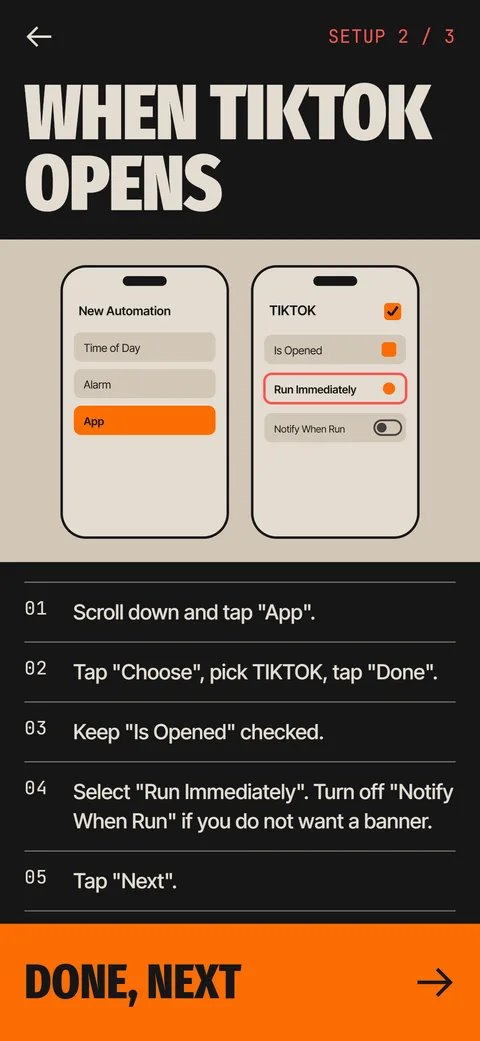
These are the steps as the Ebb setup guide shows them. Menu names can shift a little between iOS versions.
Each app needs its own automation, so repeat the steps for every app you care about. Give the work a name in your head, for example gate for the video app, because the Automation tab lists them by trigger and several similar rows can look identical after a while.
- Open the Shortcuts app and tap Automation at the bottom.
- Tap the plus button, or New Automation.
- Scroll down and tap App.
- Tap Choose, pick the app, tap Done, and keep Is Opened checked.
- Select Run Immediately. Turn off Notify When Run if you do not want a banner each time.
- Tap Next, then New Blank Automation.
- Add the action you want, for example the Ebb Gate action, and tap Done.
What is the difference between Run Immediately and Ask Before Running?
With Ask Before Running, iOS shows a notification and waits for you to confirm, which defeats the purpose if you wanted a pause. With Run Immediately, the automation runs as soon as the trigger fires. Choose Run Immediately for anything that should happen without your input.
The setting called Notify When Run controls the banner that appears when an automation ran. It is useful while testing, and annoying afterwards.
Why does the app appear for a moment first?
iOS fires the automation after the app has begun to open, so you see the app for a short time before your action takes over. The flash is normal and lasts under a second. The trigger has no setting that moves it earlier, so a Shortcut cannot prevent the flash.
If you use a banner for testing, expect it to appear at the top of the screen at the same moment. Once you are satisfied that the automation runs, switch the banner off in the automation settings so that the only thing you see is the result of your action.
What can the action be, and can it block the app?
Common uses are a Focus mode, a message to yourself or a pause screen from another app. An app can offer its own action in the list. Ebb adds an action named Ebb Gate with an App field. In the setup you search for Ebb, add Ebb Gate, and set the App field to the same app as the trigger. Ebb then comes forward with a short focus round and lets you into the original app after you pass.
No. An automation can run actions when an app opens, and some actions can open another app or show a screen on top. It cannot lock the app, stop a launch or keep you out. Anything you build with this trigger can be turned off in the Shortcuts app, which is what makes it a speed bump.
There is also a practical reason to keep the action small. Every extra step is another place for the automation to fail, and a failed automation is invisible: nothing happens, and you assume the app opened as usual. One action that you can see working is more valuable than a clever chain you cannot test.
Which launch routes should you test?
Opening an app is not one action. The same app can start from several places, and an automation that fires from one may behave differently from another. Run through the list below once after setup, with the banner still switched on, and note any route that stays silent.
If one route fails, you do not need to redo the automation. Usually the trigger is fine and the problem is a setting inside the action. Fix that first, then repeat only the route that failed.
- Tap the icon on the Home Screen.
- Open the app from the App Library or from Spotlight search.
- Switch to it from the app switcher after force-quitting it.
- Tap a link that opens the app from Messages or Notes.
- Open it from a notification banner on the Lock Screen.
How do you check that it works?
Leave Shortcuts, then open the app. If your action runs, you are done. If nothing happens, check four things: the automation is on, Run Immediately is selected, the right app is chosen under the trigger, and the action's own settings point to the same app. Ebb has a verify screen that waits for the first run and reports whether it saw it.
Test with the real app, not with the Run button inside Shortcuts. The Run button tests the actions, but it does not prove that the trigger fires when the app opens. Open the app from the Home Screen, from the App Library and from search, and make sure the automation runs each time. Launches from a link in a message can behave differently, so try that too. If it does not fire, work through automation not running on iPhone.
How do you remove or pause the automation?
Open Shortcuts, then Automation. To pause, tap the automation and switch it off. To remove, swipe left on it and tap Delete. Do this for each app. If you want to remove an app that uses the Ebb Gate completely, delete the automations first, then delete the app, and cancel any subscription in Settings.
If you only want a break, switching off is better than deleting, since you keep all the settings. Many people pause automations on holidays or travel days and turn them back on after. If you built the automation around Ebb, the app marks the gate as not seen after three days without a run, and can send an optional reminder.
What are common problems?
The automation exists but never fires, usually because it is set to Ask Before Running or because a different app was chosen. The action opens the wrong app, because the App field inside the action does not match the trigger. A banner shows each time, which means Notify When Run is on. Several automations conflict, and the fix is to keep one per app.
When you are stuck, simplify. Delete the automation, create it again from the first step and add only the trigger with a simple action such as a notification. If that fires, add your real action back. This isolates the broken part within a few minutes, which is much faster than staring at a long chain of settings.
Two mistakes cause most of the confusion. The first is building the automation on the wrong tab: it must be a personal automation under Automation, not a shortcut in My Shortcuts. The second is testing only once, in the first minute, and then never again. Revisit the setup after an iOS update, because menu labels and defaults sometimes change.
| Symptom | Likely cause | Fix |
|---|---|---|
| Nothing happens | Ask Before Running is on | Switch to Run Immediately |
| Banner every time | Notify When Run is on | Turn it off in the automation |
| Wrong app | Action's App field differs | Set it to the trigger app |
| Brief flash of the app | iOS runs it after launch | Normal, under a second |
Frequently asked questions
Can I run a Shortcut when I open an app on iPhone?
Yes. Create a personal automation in Shortcuts, choose the App trigger, pick the app and keep Is Opened checked. Choose Run Immediately so it does not ask first.
Does the Shortcut run before the app opens?
No. iOS fires it after the app has started to open, so the app can flash on screen first.
How do I stop the banner each time the automation runs?
Turn off Notify When Run in the automation's settings.
Can I use this on several apps?
Yes. Create one automation for each app. In Ebb the free version covers one gated app and Pro covers up to 12.