Ebb support
Most Ebb questions come down to the Shortcuts automation, so the answers below start there: how to set it up, why the app flashes before the gate and how to remove everything. Then come purchases, data and languages. For anything else, open Help inside the app.
Coming soon to iPhone
How do I contact support?
Open Ebb, go to You, Help, Contact support. The app opens a mail draft and adds only its version number to it. You can also email us using the contact block at the end of this page.
Where do I read the full guide to the gate?
See the gate for the flow and how to run a Shortcut when an app opens for the Apple side. The app has a three-step guide with drawings and a Troubleshooting sheet.
Contact us
Email support@dziby.com. Tell us the app name, your iPhone model and iOS version, and what happened. We read every message and usually reply within two business days.
Frequently asked questions
How do I set up the gate for an app?
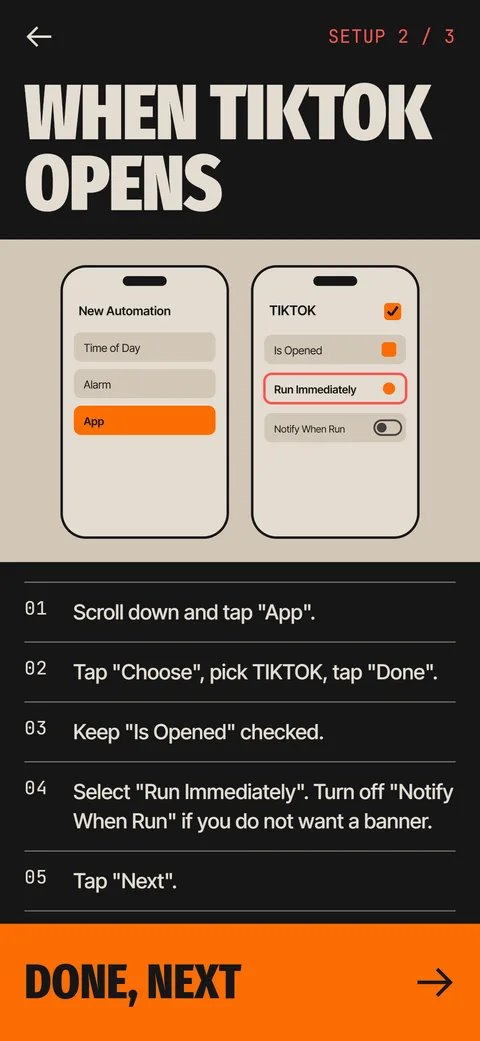
Open Shortcuts, tap Automation, tap plus, choose App, pick the app and keep Is Opened checked. Select Run Immediately, tap Next, choose New Blank Automation, add the Ebb Gate action and set its App field to the same app. Ebb's setup guide shows each step.
Why does the app flash before the Ebb gate appears?
iOS runs an automation after the app has started to open, so you may see the app for under a second. If you see a banner each time, turn off Notify When Run in the automation.
Ebb says my gate is not seen. What should I do?
Open the gate in Ebb and use Check setup. Make sure the automation is set to Run Immediately and that the action's App field matches the app. Then open the app again and wait for the gate.
Can Ebb block short videos inside an app?
No. Ebb runs when an app opens, not inside it. For a video app, put a gate on the app and choose short windows after a pass.
How do I remove Ebb completely?
Open Shortcuts, then Automation, swipe left on each Ebb automation and tap Delete. After that delete the Ebb app. If you subscribed, cancel in Settings first, because deleting the app does not cancel a subscription.
How do I cancel the Pro subscription?
Go to Settings, tap your name, then Subscriptions, choose Ebb and cancel. You can also tap Manage subscription under You, Subscription in the app. Cancel at least 24 hours before the period ends.
How do I restore my purchase on a new iPhone?
Open You, Subscription, or the paywall, and tap Restore with the same Apple Account you used to buy. Ebb checks the plan through the billing service and Apple.
How do I get a refund?
Apple handles refunds. In the app, You, Subscription has a Request a refund button that opens Apple's own request flow.
How do I export or erase my data?
Open You, Data and privacy. Export my data creates a JSON file. Erase all data removes everything Ebb stored. Your Shortcuts automations and App Store subscription stay until you remove them.
Which languages does Ebb support?
English and Russian. Ebb follows your phone language, and you can switch it under You, Language.
Keep exploring
 How to Run an iPhone Shortcut When an App OpensThe App trigger in Shortcuts, step by step, with the settings that matter and what to do when it flashes.