How to limit a short-video app on iPhone: three ways, from easy to strict
To limit a short-video app on iPhone, open Settings, Screen Time, App Limits, Add Limit, and choose the app with a daily time. For something stricter, add a Screen Time passcode held by someone else. For something earlier, run a Shortcuts automation that puts a pause in front of the app.
Coming soon to iPhone
Which way suits you?
Pick by how much friction you need. A daily limit is the lightest, a passcode held by someone else is the strictest, and a pause before the app opens sits in the middle.
Most people try the first, find they tap through it, and move to one of the others. That is a normal path and not a failure.
| Method | Friction | Weak spot |
|---|---|---|
| App Limits | Low | Tapping Ignore Limit takes a second |
| App Limits plus passcode | High | Someone else must hold the code |
| Pause before the app opens | Medium | Can be switched off by you |
How do you set an App Limit for a short-video app?
App Limits are part of Screen Time, which Apple documents in the iPhone User Guide. The steps take a minute.
The limit resets at midnight. When you reach it, iOS shows a screen with options to ask for more time, and the options include ignoring the limit for the day. The reasons that button undermines the limit are covered in Screen Time and the Ignore Limit button.
- Open Settings and tap Screen Time. Turn it on if it is off.
- Tap App Limits, then Add Limit.
- Open the Social category and tick the app, or search for it. Tap Next.
- Set the time, for example 30 minutes. Use Customize Days if weekends differ.
- Leave Block at End of Limit on, then tap Add.
How do you make the limit harder to bypass?
Add a Screen Time passcode, and ask a partner, friend or parent to choose it so that you do not know it. Apple explains how to create, change and remove one in its guide to the Screen Time passcode. With a passcode you do not know, Ignore Limit needs the code every time.
This works well for people who want a wall. It also has costs. You depend on another person, and you may feel infantilized, which is a common reason people turn the whole thing off. If you can live with that, it is the most reliable setup on the phone itself.
What does a pause before the app do differently?
A limit acts late. By the time it appears you have already spent the minutes. A pause acts at the start, when the urge to open the app is strongest and the decision is easiest to change.
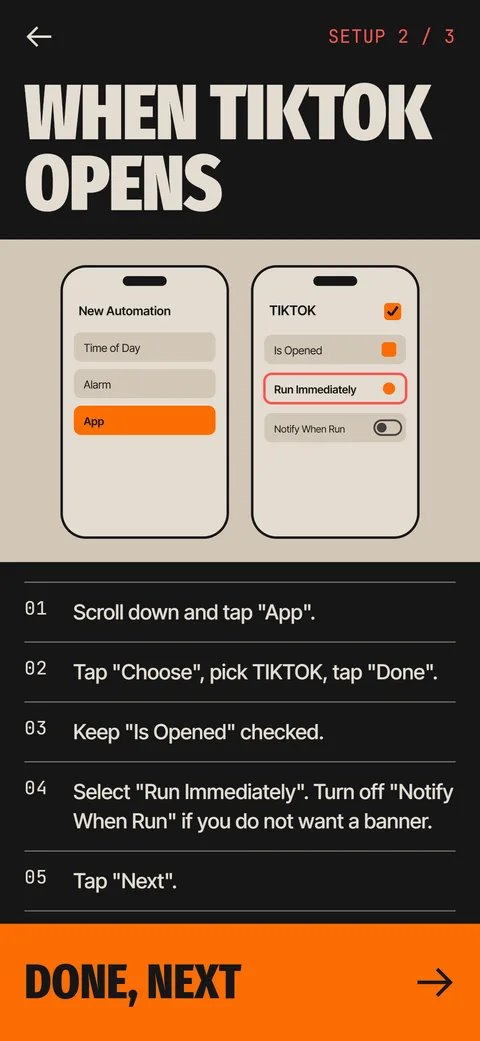
You build one in the Shortcuts app with a personal automation: trigger on the app opening, choose Run Immediately, and add an action such as Show Alert or Wait. The full walkthrough is in how to run a Shortcut when an app opens. Apple's Shortcuts guide on personal automation documents the trigger.
Plain alerts become wallpaper after a few days. A pause only works while it costs a little effort.
How does Ebb handle a short-video app?
Ebb is an iPhone app, still in development, that uses the same Shortcuts trigger. When the app opens, the automation runs the Ebb Gate action and Ebb comes forward with a short focus round. Pass it and Ebb opens the app for you, with a window of 5, 10 or 15 minutes. Turn back and it counts as turning back.
In the free version a round lasts 15 seconds. In Pro, the first round on an app each day takes 15 seconds, the second 30 and later ones 60, and a failed round does not raise the next cost. Details are on the gate and pass costs.
Ebb is a speed bump, not a lock. It cannot stop you from deleting the automation, and it says so.
What about the app's own tools?
Many short-video apps have screen time and wellbeing options inside their settings, and they change from version to version, so look in the app's own settings. They are worth a look because they set limits from inside the app. Treat them as a complement. A tool inside the app you are trying to use less is easy to dismiss in the same way as any other prompt.
What else helps?
A few cheap changes make any limit work better.
- Move the app off the first Home Screen page, into a folder or the App Library.
- Turn off its notifications. Most feed use starts with a banner.
- Log out after each session. Typing a password is a few seconds of friction.
- Pick a replacement before you hit the limit. Two minutes of anything else is enough to see whether you still want the feed.
Who should avoid a hard limit?
Anyone who uses a short-video app for work, such as a marketer or a creator, will find a hard block annoying. For those users a pause or a soft limit tends to survive longer, because it does not stop the work and still interrupts the loop.
How long should the limit be?
Start from your real number. Look at your weekly average for the app in Screen Time, then set the limit at about 70 percent of it. If you use it for 90 minutes a day, try an hour. Cutting to 15 minutes overnight usually lasts until the first bad evening.
Lower it every two weeks by 10 or 15 minutes if the current level feels easy. A gradual path is more likely to stick than a dramatic cut, and it teaches you which parts of the day the feed fills. If you hit the limit before dinner every day, the limit is too tight or the habit is stronger than you thought. Adjust the number, not your opinion of yourself.
What should you do when the limit screen appears?
Treat it as a question, not an obstacle. Ask what you were looking for when you opened the app. Often the answer is nothing, which is useful information. Close the app and do one small thing: drink water, stand up, text a friend. Two minutes later, check whether you still want the feed. If you do, ignore the limit knowingly and move on, because a deliberate choice is better than a reflex.
Frequently asked questions
Can you set a time limit on a short-video app on iPhone?
Yes. Go to Settings, Screen Time, App Limits, Add Limit, choose the app and set a daily time.
Why do I keep ignoring my app limit?
Screen Time lets you tap Ignore Limit unless a passcode that you do not know protects it. A pause before the app opens catches the habit earlier.
Does a Screen Time limit reset every day?
Yes. App Limits reset at midnight, and you can set different limits for different days.
Can Ebb block a short-video app?
No. Ebb puts a short focus round in front of the app through a Shortcuts automation. It cannot lock the app or stop you from removing the automation.
Does Ebb work inside the app?
No. It runs when the app opens, not inside it.
Keep exploring
 How to Run an iPhone Shortcut When an App OpensThe App trigger in Shortcuts, step by step, with the settings that matter and what to do when it flashes.The Ebb GateA Shortcuts automation opens Ebb first. Pass the round, then pick 5, 10 or 15 minutes.How to Stop DoomscrollingSeven steps that add friction before the feed opens, with sources and a table of what works.Why Are Short-Video Apps So Hard to Put Down? 6 ReasonsSix design features that keep a feed going, with the psychology in plain terms and a few ways to add a stop.