
iPhone Shortcuts automation not running: eight things to check
If a Shortcuts automation does not run, check these first: it is switched on, Run Immediately is selected instead of Ask Before Running, the trigger matches (for an app, Is Opened is ticked), the app field names the right app, and the shortcut actions still exist. Test by running the shortcut by hand.
Coming soon to iPhone
Why would an automation not run?
A personal automation has three parts: a trigger, a set of actions and a run mode. A problem in any one of them looks the same from the outside, which is nothing happening. Work through the parts in order, from the cheapest check to the most work.
Apple describes the basics in the Shortcuts guide on personal automation. The checks below come from that model.
Check 1: Is it switched on?
Open Shortcuts, tap Automation and open the automation. Make sure Enable This Automation is on. An automation can be turned off by accident, or it can come off after you edit it. A grayed-out row in the list is a clue.
Check 2: Is it set to Run Immediately?
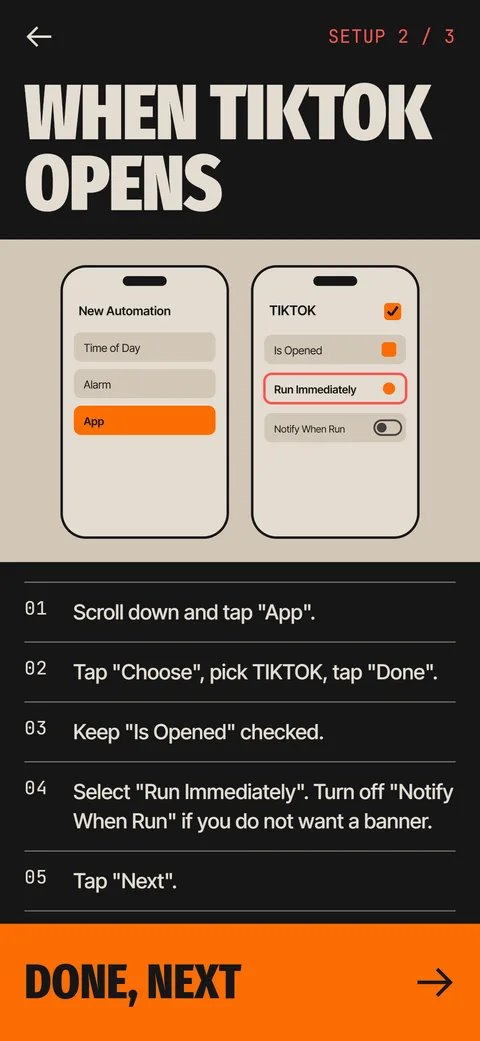
Under the automation, look for Ask Before Running and Run Immediately. With Ask Before Running, iOS shows a notification and waits for your tap, which can look like the automation did not work. Choose Run Immediately. Turn off Notify When Run if you do not want a banner each time.
Check 3: Is the trigger correct?
For an app trigger, pick App, then Is Opened. If both Is Opened and Is Closed are ticked, the automation fires twice. If Is Opened is unticked, it never fires on launch. Open the trigger and read it as a sentence: When App is opened, run this.
Check 4: Is the app field right?
This catches many people. The app in the trigger must be the one you actually open. A copy of an app, a web clip on the Home Screen or a similar name can send the trigger to the wrong place. If you use Ebb, its setup check reports when the gate ran for a different app and tells you to fix the App field.
Check 5: Do the actions still exist?
If the automation runs a shortcut, open that shortcut and run it by hand. If it fails there, fix it first. Deleted shortcuts, renamed apps and removed actions all break an automation without a clear message. After an iOS update, open the shortcut once to let it refresh.
Check 6: Is something else interrupting?
A Focus, a restriction or a Screen Time rule can change what an app or an action may do. Screen Time Content and Privacy Restrictions can block some actions. If the automation worked yesterday and not today, think about what changed in settings.
Check 7: Delete it and rebuild it
Rebuilding is often faster than hunting. Note the settings, delete the automation and create it again. It takes about two minutes. If the new one works, the old one had a stale setting.
Check 8: Restart and update
Update iOS and restart the phone. Shortcuts is a system feature, and bugs get fixed in updates. A restart clears stuck states. After the restart, open the app and watch whether the automation runs. If it still fails, go back to Check 7 and rebuild it from scratch.
What can an app-open automation not do?
It runs after the app begins to open, so you may see the app for a moment before the action appears. That is how iOS runs the trigger, and it usually lasts under a second. The trigger also cannot see what happens inside the app, so it cannot stop a feed you are already in.
Ebb is built on this trigger. Its three-step setup uses the Ebb Gate action, and the in-app help covers a gate that does not show up, a banner on every run and an app that flashes before the gate. The page on the gate describes the status chip that tells you whether a run was seen. Ebb requires iOS 17 or later.
How do you test an automation properly?
Testing prevents guesswork. Follow the same four steps every time.
Write down what you changed. It saves you from repeating a fix that did not work.
- Run the shortcut by hand from the Shortcuts tab. If it fails, the problem is in the actions, not the trigger.
- Trigger the event once with the phone awake and in use, for example by opening the app.
- Watch for the result. If nothing happens, open Automation and check whether a notification is waiting.
- Change one setting, then test again. Changing three at once hides the cause.
What are the most common mistakes with the app trigger?
Three come up again and again. People pick the wrong app because two apps have similar names. They tick both Is Opened and Is Closed and get double runs. And they leave the mode on Ask Before Running, so nothing happens until they tap a notification they never saw.
A fourth mistake is expecting the automation to block the app. It runs a set of actions, and then the app opens. If you want a pause, the action itself must create it, such as a game or a Wait step. An alert alone does not stop you from tapping through.
How does Ebb help you check a gate?
Each Ebb gate has a status chip. Connected shows the last time Ebb saw a run. Not seen yet means the first check has not been completed. Not seen 3 days means no opens have arrived in three days, either because you took a break or because the automation is off. A Check setup button reopens the guide. The gate log lists every run with its time, cost and result, so you can see exactly what Ebb received. The setup steps are in how to run a Shortcut when an app opens.
When is it a bug and when is it a setting?
If the automation worked for weeks and stopped after an update, suspect a bug and look for a newer iOS release. If it never worked, suspect a setting, usually Run Immediately, the app field or the toggle. If it works only sometimes, suspect a conflict, such as a Focus or a second automation with the same trigger. Two automations that fire on the same app can interfere, so keep one per app.
Apple Support Communities are a good place to check whether others report the same behavior after a given update. Search with the exact iOS version number.
Frequently asked questions
Why is my Shortcuts automation not running automatically?
The most common causes are that it is switched off, set to Ask Before Running, or tied to the wrong app or trigger. Check those three first.
How do I make a Shortcuts automation run without asking?
Open the automation and select Run Immediately instead of Ask Before Running.
Why do I get a notification every time the automation runs?
Notify When Run is on. Turn it off in the automation settings.
Why does the app flash before my automation runs?
iOS runs the automation after the app starts to open. The delay is usually under a second.
Can an automation run when I open a specific app?
Yes. Create a personal automation with the App trigger, choose the app, and tick Is Opened.
Keep exploring
 How to Run an iPhone Shortcut When an App OpensThe App trigger in Shortcuts, step by step, with the settings that matter and what to do when it flashes.10 iPhone Automations to Use Your Phone LessTen Shortcuts automation ideas for less phone use, each with its trigger, its action and a note on its weak spot.The Ebb GateA Shortcuts automation opens Ebb first. Pass the round, then pick 5, 10 or 15 minutes.Ebb SupportFast answers on the Shortcuts gate, subscriptions, data export and erase.